Audio and accessibility
Lightning announces itself with a short electrical snap. A Barrier gives a pitched resonance when it takes a hit, then changes sound as it cracks and breaks. Listening to the contact can tell you what intercepted a shot before you turn to look.
Hear six ability pairs
Play the 31-second multiplayer recording. Each group plays the first ability’s R, the second ability’s R, then their X releases in the same order. The recording uses the casting player’s in-game mix.
| Start | First ability | Second ability |
|---|---|---|
| 0:00 | Lightning | Lightning Master |
| 0:05 | Barrier | Energy Discharge |
| 0:10 | Telekinesis | Pure Gravity |
| 0:16 | Time Manipulation | Speed |
| 0:21 | Conjure: Vines | Botanist |
| 0:26 | Particles | Blademaster |
Adjust the mix
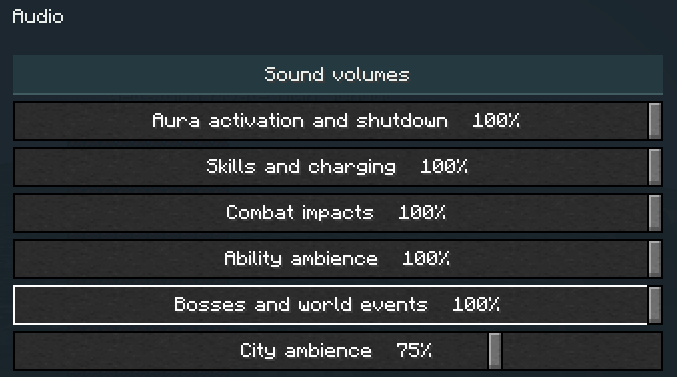
Open K → Settings → Audio. Lower Aura activation and shutdown to soften toggles while keeping attack releases audible. Lower Ability ambience for quieter active auras. Skills and charging, Combat impacts, Bosses and world events and City ambience each have their own control. Minecraft’s master volume and sound categories also apply.
Captions and visual comfort
Turn on Show Subtitles in Minecraft’s Music & Sounds settings for captions on supported sounds. v1.0 includes English and French captions for the remastered sounds.
Open K → Settings → Visuals to choose between the restrained Canon aura and the more detailed Cinematic aura. Both appear immediately when you press R. The mod also offers impact-effect and injury-visual settings for your own client.